

Semantic Search & Discovery
If you have used FME for a while, I am sure you are like us, you have accumulated hundreds of FME workspaces over the years, representing significant investment in data integration logic and knowledge. These workspaces end up become isolated assets that are difficult to find and reuse.
It's hard - when using FME it can be a struggle to find existing solutions when building new workflows, this leads to duplicated effort where similar logic is recreated.
When experienced FME users leave the sophisticated workflows and techniques embedded in their workspaces are not easily discoverable and accessible. With a lack visibility into which transformers are being used, making it challenging to identify best practices, standardise approaches, identify security risks or find proven patterns for common tasks like API integration, geometry validation or database operations.
The result is wasted development time, inconsistent implementation patterns, lost knowledge and an inability to make use of existing workflow steps.
Current methods to search for workspaces rely on keyword search and manual discovery, this is why we have developed a more effective way to search and discover FME Workspaces and components.
Duplicated Development
A team member spent two days building an FME workspace to read data from a REST API, parse the JSON response and write it to a PostgreSQL database. Two folders away, a colleague had built almost the exact same workspace eighteen months earlier.
How often is this something you have experienced?
This isn't unusual, in our experience FME workspaces used by a business often contain patterns that already exist elsewhere, duplicated development or reinventing the wheel on data workflows is a real issue.
The problem isn't that people are lazy. It's that finding an existing workspace's is a challenge. Folder structures don't scale, naming conventions are inconsistent and the person who knows where everything isn't contactable today.
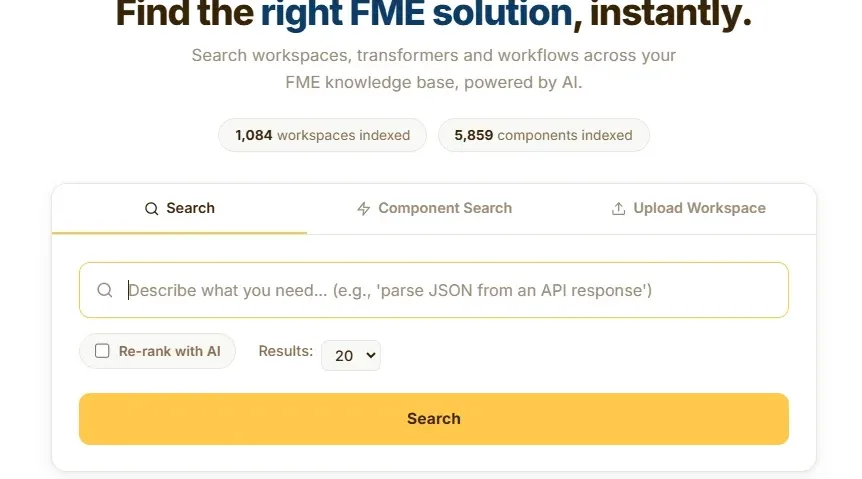
We built FME Workspace Intelligence to fix this. It indexes FME workspaces using multimodal AI and makes them searchable in plain English covering what transformers are used, how they connect and how data flows through them.

Your entire FME workspace collection, queryable by natural language or specific transformer names
Your team understands the indexing and search process and can adapt it as your collection grows
Processes new or modified workspaces, keeping the index current without reprocessing everything
Discover transformer usage, database and web connections and dependencies across your FME Workspaces
What if you could search against your FME workspaces?
Every workspace your team has built over the years - the data migrations, API integrations, one-off spatial transformations, current workspaces running in production - all indexed and searchable. Accessible to anyone on your team in plain English.
Through a short technical solutions engagement we deploy an implement a range of tools to index your FME Workspaces - on-premise, cloud or hybrid and provide your team with a browser-based search interface and REST API. Your intellectual property stays with you.

Key Benefits
The biggest cost is the one you do not see. When developers cannot find existing workspaces, they build from scratch. A searchable index means proven logic is reused rather than reinvented, saving development time across every new project.
Neat workflows are part of so many FME Workspaces, these techniques and solutions can remain discoverable. The index and search solution captures what each workspace does and how it is structured, turning neat workflows into a shared organisational resource.
Traditional search relies on keyword matching, semantic search understands context, so a query for 'geometry validation' or API Calling will return relevant workspaces even if the transformers or annotations in the workspace do not have these keywords.
With visibility into how different workspaces have been created and the components they use its possible to identify best practices, flag inconsistent approaches and in effect avoid the need for building a standard workflows document.
Engagement
Avineon Tensing deliver this as a short engagement. We configure the indexing workflow for your environment, build the vector database, run and validate it against your workspace collection and hand over the FME workspaces alongside full documentation.
This is not a black box. We sit with your team, explain how the indexing and search workspaces work and mentor them through the process. When the engagement ends, your team has the knowledge and confidence to run, modify and extend the workflow independently.
The workflow requires FME Form 2024 or above. For scheduled re-indexing or providing search as an internal service, FME Flow is recommended.
Get in touch with our team
Ready to discuss your geospatial data challenges? Our certified FME and Esri specialists are here to help you navigate the complex world of spatial intelligence with practical, effective solutions.
Frequently Asked Questions
Semantic search uses AI to index and retrieve FME workspaces based on what they do and how they are structured rather than relying on filenames or folder locations. It allows your team to search in plain English and find relevant workspaces by meaning.
Standard file search only matches against filenames and folder paths. If someone named a workspace "project_v3_final.fmw" there is no way to know it contains a proven geometry validation pattern. Semantic search reads the internal structure and logic of each workspace, making everything discoverable regardless of naming conventions.
The workflow extracts transformers, connection patterns, SQL queries, parameters and annotations from each workspace file. It combines structural analysis of how transformers are connected with semantic analysis of what operations they perform. These are converted into vector embeddings that capture both the architecture and the purpose of each workspace.
Your workspace files stay exactly where they are. The indexing workflow reads them in place from local directories, network shares or version control systems. Only the extracted metadata and embeddings are stored in the vector database.
The system works with DuckDB for a lightweight single-file deployment or PostgreSQL with the pgvector extension for enterprise installations. We configure the appropriate option during the engagement.
Not necessarily. The workflow connects to Google Gemini, OpenAI or a local LLM deployment. If your organisation has strict data security requirements, the entire process can run within your infrastructure with no external API calls.
Yes. We hand over the FME workspaces with full documentation and provide mentoring so your team can run, modify and extend the workflow independently. This is not a black box delivery.
The workflow tracks file modification timestamps and only processes new or changed workspaces on each run. There is no need to rebuild the entire index when a few workspaces are added or updated.
The workflow requires FME Form 2024 or above. If you want to schedule automated re-indexing or provide search as an internal service, FME Flow is recommended but not required for the core functionality.
Yes. Custom transformers are identified and indexed separately as reusable components, creating additional searchable entries. This makes it easy to find and promote shared building blocks across your organisation.
The system is designed to handle collections ranging from dozens to thousands of workspace files. Indexing performance scales with workspace complexity, but incremental re-indexing keeps ongoing processing fast regardless of total collection size.
Yes. The workflow can scan directories cloned from Git or other version control systems. It treats them the same as any local or network directory.