


An exciting update in FME 2026.2
Just in case you hadn’t noticed, FME 2026.2 just ‘dropped’; to coin the modern parlance, and there’s something tucked away in the new release that we’re rather excited about! If you’ve ever built a workspace in FME and thought, “You know what this needs? A loop… but without the usual custom transformer headaches,” then good news, your wish has been granted.
FME now includes native looping, which means iterative workflows can be created directly in the workspace authoring experience. In other words, looping is no longer something you have to assemble through custom transformer gymnastics or an interpretive dance involving the WorkspaceRunner.
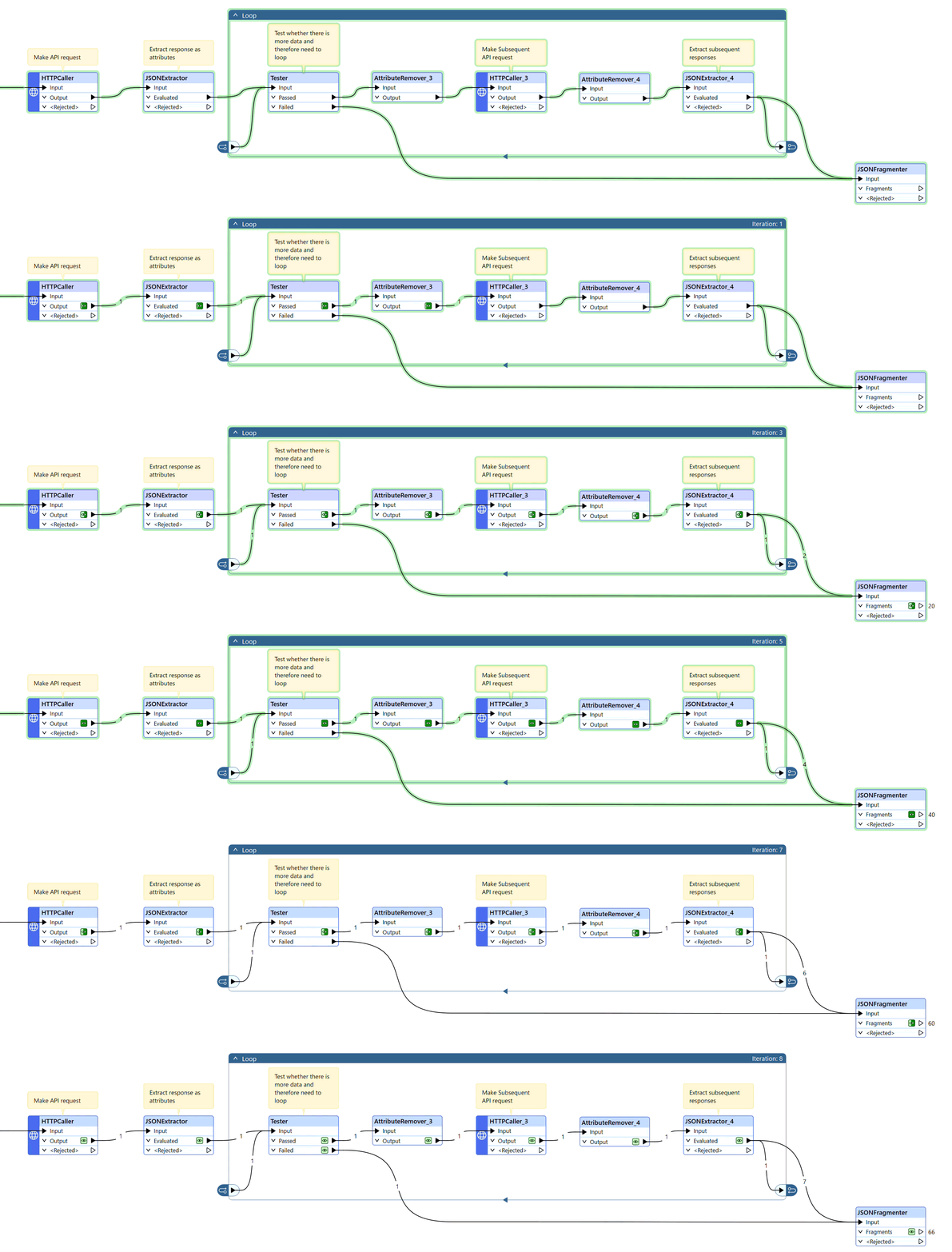
This is a pretty big deal.
Why this matters
Historically, if you wanted to loop through data or repeat a process in FME, you often had to build a custom transformer to handle it. Custom transformers are powerful, but, they can also be a little, well… intimidating.
Let’s be honest, custom transformers definitely have their place and we’re a big fan of them, as long as they are created when you really need them. They’re useful, sure. But they can also add complexity, especially when you’re trying to figure out what’s happening inside one and troubleshoot why a dataset is stuck in a loop of its own existential crisis. Also, as soon as you create a custom transformer you have to maintain it, so you have to know you’ve built it for the right reasons and building one just to be able to perform a loop has been a necessary evil, until now.
Native looping changes everything.
Now, instead of packaging the logic away inside a custom transformer or relying on workaround-heavy patterns, you can create iterative workflows directly in the workspace. That means:
- less setup;
- less complexity;
- easier debugging; and
- fewer opportunities for a future-you to open a workspace and mutter, “What was I thinking?”
Take the image above, that's a classic use case of how native looping just makes sense. Here we're dealing with making a request to an API that gives us back a paginated response. We need to loop around a number of times in order to guarantee that we've got back all of the pages that we need to handle. When this isn't a fixed number, we can incorporate a test to ensure we haven't missed anything. It works a charm!
What Safe Software says
Safe Software describes it nicely: “Native looping brings iterative workflows directly into the workspace authoring experience. Users can build advanced automation and control-flow logic without relying on complex custom transformers, WorkspaceRunner transformer patterns, or other difficult-to-maintain workarounds, making it easier to build, maintain, and debug as a result.”
That pretty much sums it up. Native looping is about bringing the logic closer to where you’re actually building the workspace, instead of hiding it behind a layer or two of complexity.
So what’s new?
At a high level, native looping makes it possible to handle repeated processing in a much more straightforward way inside FME itself.
That’s especially useful when you need to:
- repeat a set of actions until a condition is met;
- step through records in an iterative way; or
- structure workflows that naturally need control-flow logic.
Instead of building a custom transformer just to create a loop, you can now author that loop natively in your workspace …and that’s the key part, it feels like part of the workspace, not a workaround glued onto the side of it.
A friendlier way to build loops
Custom transformers have long been one of those FME features that can make new users pause for a moment. They’re incredibly powerful, but they can, in some scenarios feel like the point where the workspace stops being “drag and drop” and starts being “drag and then carefully negotiate with the transformer until it cooperates.” Native looping lowers that barrier.

It makes iterative logic more approachable for people who want to build something smart without first becoming a part-time custom transformer architect. For experienced users, it removes a layer of overhead and makes workflows easier to understand at a glance, though bear in mind, if you want to loop in earlier versions of FME, you’ll need to continue to do it inside a custom transformer!
Easier to build, easier to maintain, easier to debug
One of the best things about native looping is that it improves the lifecycle of a workspace, not just the initial build. When looping logic lives directly in the workspace:
- it’s easier to see how the workflow operates;
- it’s easier to troubleshoot when something goes wrong; and
- it’s easier to update later without unpacking a custom transformer like it’s a box of Christmas tree lights.
This matters a lot in real world projects, where workspaces rarely stay static for long. Requirements change. Data changes. Someone asks for “just one small adjustment” that turns into a whole new branch of logic. Native looping, when you need to loop makes those changes a lot less painful.
The bottom line
Native looping in FME is one of those features that sounds simple, but at Avineon Tensing we think will have a big impact, to us as FME specialists, but also to our customers.
More automation.
Fewer mysterious custom transformers lurking in the workspace.
So, native looping in FME 2026.2 is a welcome addition and we’re excited to start using it!
Let's explore what this could do for your work
Get in touch with Simon Green (FME Certified Professional) if you’d like us to help you understand how it supports the work you do, and where it can take you next.


